Alright, so here’s what happened:
I saw a UGC video that was so clean I genuinely didn’t believe it was AI.
Naturally, I went down the rabbit hole to figure out how people were doing this.
Every post I found was the same:
- “Here’s a guide…” → paywalled
- “Just sign up for this tool…” → affiliate link
- “Buy this course…” → lol no
Nobody was actually sharing the automation behind it — just breadcrumbs.
So I said screw it.
I spent the last few hours researching, testing tools, breaking stuff, fixing it, and finally building a fully automated AI-UGC pipeline that actually works.
No paid course. No upsells. No BS.
Since Reddit helped me get started (even if indirectly), I’m giving the whole thing away 100% free:
What I’m sharing:
- The full step-by-step automation flow
- All tools used (free/cheap alternatives included)
- Prompts, templates, and workflows
- How to generate realistic UGC without touching a camera
- Optional upgrades if you want studio-level outputs
- A plug-and-play automation setup you can duplicate
Who this helps:
- UGC creators
- Agencies
- Freelancers
- Indie founders
- Anyone trying to make content without filming themselves
Why I’m posting it:
Because the info shouldn’t be hidden behind a $297 “AI UGC Masterclass.”
If something can be automated, the internet deserves to know.
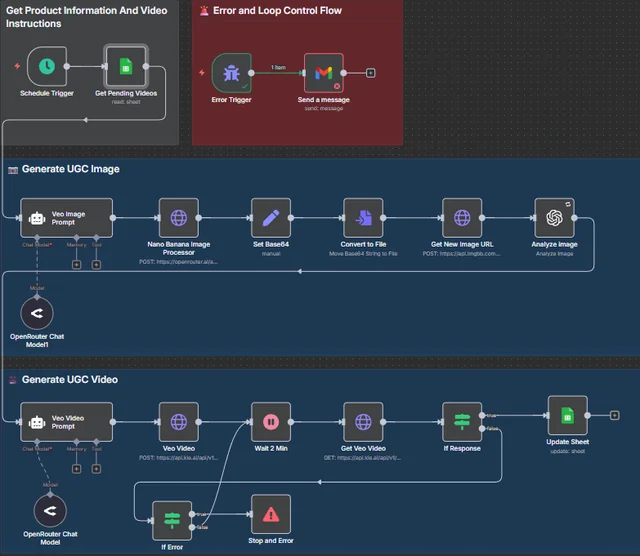
Step-by-step workflow
- Trigger — Schedule kicks off the workflow. (1s)
- Pull sheet rows — Fetch only “Pending”. (1s)
- Generate UGC image prompt — OpenRouter agent. (2–5s)
- Create image — Gemini Flash with product photo. (3–6s)
- Convert + upload — Encode and upload to ImgBB. (2–3s)
- Analyze — OpenAI Vision returns a detailed breakdown. (1–2s)
- Generate video prompt — Second agent builds Veo-ready script. (2–4s)
- Send to Kie.AI Veo — Video job created. (1s)
- Wait + poll — Loop until video is ready. (30–120s)
- Update sheet — Insert final UGC video link. (1s)
Implementation notes
- Tech: n8n, Google Sheets API, OpenRouter, OpenAI, ImgBB, Kie.AI
- Use environment variables for API keys.
Resources:
- Link to YT Video
- Link to Guide
- Link to Visual Workflow
- Link to Code
- Link to Google Sheet
- Link To Video Output
Total cost? Around Approx $2 for 10 Videos.